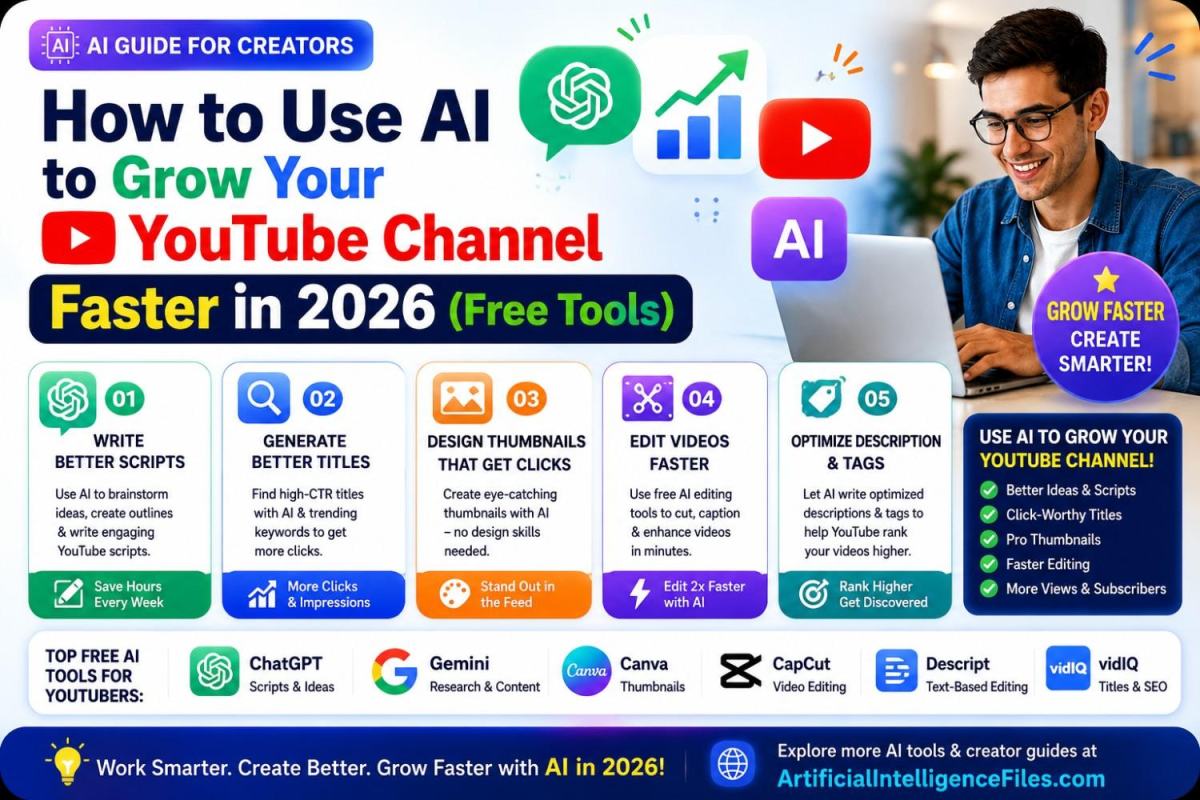
Growing a YouTube channel used to mean spending hours writing scripts, designing thumbnails, and editing footage late into the night. In 2026, that has changed completely.
AI tools for YouTube creators are now powerful enough to help you write better scripts, design eye-catching thumbnails, and edit videos in a fraction of the time. The best part? Many of these tools are completely free.
In this guide, you will learn exactly how to use AI at every stage of your YouTube content — from planning to publishing — even if you are just starting out.
Why YouTubers Are Switching to AI in 2026
Over 500 hours of video are uploaded to YouTube every single minute. That means your video has only a second or two to grab attention before someone scrolls past it.
This is exactly where AI helps. It does not replace your creativity — it removes the boring, time-consuming parts of content creation so you can focus on what actually matters: making great videos. Creators using AI tools report saving 5 to 10 hours every week on planning, editing, and design work.
1. Use AI to Write Better Scripts
A strong script is the backbone of every successful YouTube video. Instead of staring at a blank page, you can use AI to brainstorm ideas, structure your video, and write a draft in minutes.
How to use AI to write YouTube scripts:
Open ChatGPT or Google Gemini and describe your video idea. Ask it to write a hook for the first 15 seconds, since that is when most viewers decide whether to stay or leave. Then ask for a simple outline with an introduction, main points, and a strong call to action at the end.
For example, try this prompt: "Write a YouTube script outline for a 10-minute video about budget travel tips for beginners. Include a strong hook and three main sections."
💡 Tip: Never use the AI script word-for-word. Read it, rewrite parts in your own voice, and add your personal stories. This keeps your content authentic and helps you stand out.
2. Generate Eye-Catching Titles That Get Clicks
Your title is the second thing viewers see after your thumbnail. A weak title means fewer clicks, even if your content is great.
Use ChatGPT to generate 10 to 15 title options in seconds. Ask it to make the titles curiosity-driven, include numbers where relevant, and stay under 60 characters so they don't get cut off on mobile screens.
You can also try vidIQ, a free browser tool built specifically for YouTube. It shows you trending keywords in your niche and gives AI-powered title suggestions based on what is actually working right now on the platform.
3. Design Thumbnails Without Any Design Skills
Thumbnails are one of the biggest reasons people click — or scroll past — your video. The good news is you no longer need Photoshop or design experience to create one.
Canva is the easiest starting point. It has thousands of free YouTube thumbnail templates, and its Magic Design AI feature can generate a polished thumbnail from a simple text description. Just type your video topic, pick a template sized for YouTube, and customize the text and colors to match your brand.
For something more advanced, Adobe Express offers free AI background removal and YouTube-sized templates, which is great if you want a clean, professional look with your face cut out and placed on a custom background.
Quick thumbnail tips that actually work:
- Use a real photo of your face with a clear, strong emotion
- Keep text short — 3 to 5 words maximum
- Use bright, high-contrast colors so it stands out in a crowded feed
4. Edit Videos Faster with Free AI Tools
Editing is usually the most time-consuming part of making a video. AI tools for video editing free of cost are changing that completely.
CapCut is one of the most popular free editing tools among creators in 2026. It can automatically remove silences, add captions, and even suggest background music that matches your video's mood — all powered by AI.
If you create a lot of talking-head content, Descript lets you edit your video by simply editing the text transcript. Delete a sentence from the text, and it removes that part of the video automatically. This alone can cut your editing time in half.
5. Optimize Your Description and Tags
Many creators forget that the YouTube algorithm also reads your description and tags to understand what your video is about.
Ask ChatGPT to write a YouTube description that includes your main keyword naturally in the first two lines, a short summary of the video, and relevant hashtags. You can also ask it to suggest 10 to 15 tags based on your video topic to help YouTube understand and recommend your content to the right audience.
Final Thoughts
AI is not going to make a great channel out of a boring one — but it will help you create better content, faster, and with far less stress. Whether you are writing scripts, designing thumbnails, editing footage, or optimizing your upload, there is a free AI tool ready to help.
Start with just one tool from this list today. Once you see how much time it saves, you will quickly find yourself using AI at every step of your content creation process.
Want to discover more free AI tools and creator guides? Visit ArtificialIntelligenceFiles.com for the latest AI tools, news, and tips updated every week.
